Descripción
Autocomplete Location Field for Contact Form 7 allows you to add a Google Address Autocomplete field directly inside your Contact Form 7 forms.
This plugin integrates with the Google Places API to provide real-time address suggestions as users type. It improves user experience, reduces typing errors, and ensures accurate address data collection.
Pro Version | Support | Google Place Key Documentation
Perfect for:
– Business contact forms
– Delivery address forms
– Booking forms
– Service location forms
– Real estate websites
– Local business websites
Key Benefits
✔ Improve form usability with address auto suggestions
✔ Reduce incorrect or incomplete address submissions
✔ Fast and responsive Google Places integration
✔ Easy setup with Google API Key
✔ Seamless integration with Contact Form 7
How It Works
- Install and activate the plugin.
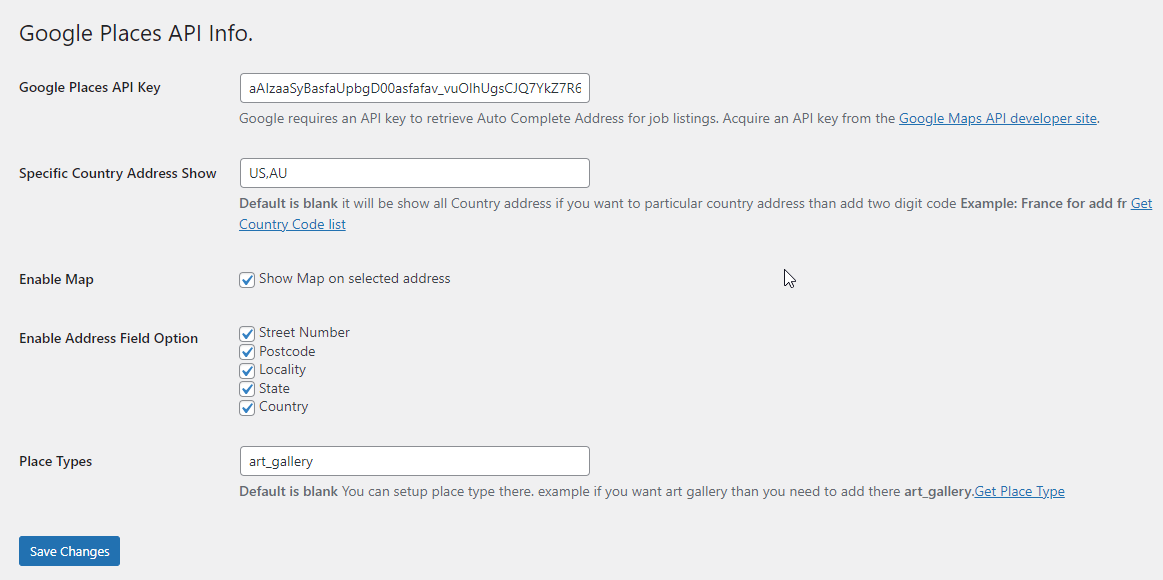
- Go to Contact Google Place API in WordPress admin.
- Enter your Google API Key.
- Open your Contact Form 7 editor.
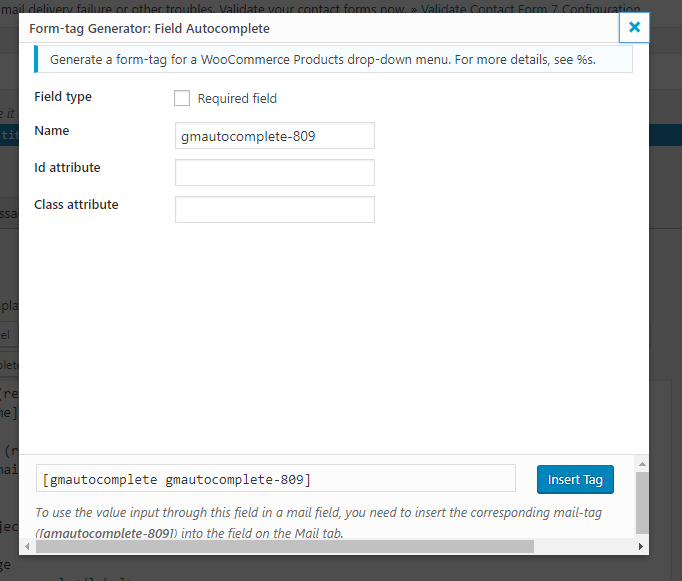
- Click on Field Autocomplete to insert the location field.
- Save your form and publish it.
You can generate your Google API Key from:
https://developers.google.com/maps/documentation/javascript/places-autocomplete
Free Features
- Google Address Autocomplete
- Works with Contact Form 7
- Easy API Key setup
- Lightweight and optimized
Pro Features
- Restrict autocomplete to specific countries (US, AU, etc.)
- Enable Google Map display with selected location
- Separate address components (Street, City, State, Country, Postcode)
- Place type restriction (e.g., art_gallery, establishment, geocode)
- Custom placeholder translation
- Priority support
Upgrade to Pro:
https://www.codesmade.com/store/autocomplete-location-field-contact-form-7-pro/
Capturas
Instalación
- Upload the plugin folder to
/wp-content/plugins/ - Activate the plugin from the WordPress Plugins menu
- Add your Google API key under Contact Google Place API
- Add the Autocomplete field inside Contact Form 7
FAQ
-
1. The map or autocomplete is not working. What should I do?
-
Open your browser’s Inspect tool and check the Console tab for Google API errors. Make sure:
– Your API key is correct
– Places API is enabled
– Billing is enabled in Google Cloud -
2. How do I add the autocomplete field in Contact Form 7?
-
Open your form editor and click Field Autocomplete. It will automatically insert the shortcode into your form.
-
3. Can I limit results to a specific country?
-
Yes, this feature is available in the Pro version.
-
4. Do I need a Google API key?
-
Yes. This plugin requires a Google Places API key to function.
-
5. Where can I get support?
-
Support is available at:
https://www.codesmade.com/contact-us/
Reseñas
Colaboradores y desarrolladores
«Autocomplete Location Field for Contact Form 7» es un software de código abierto. Las siguientes personas han colaborado con este plugin.
ColaboradoresTraduce «Autocomplete Location Field for Contact Form 7» a tu idioma.
¿Interesado en el desarrollo?
Revisa el código , echa un vistazo al repositorio SVN o suscríbete al registro de desarrollo por RSS.
Registro de cambios
1.0.0
- Initial release
- Google Places Autocomplete integration
- Contact Form 7 tag support